PAPER SUBMISSION
Full Paper Submission Guidelines – Extended Deadline 25th October 2026
TL;DR – Only use the official WTC2027 template below and max 8 pages (including figures, tables, references)
The submission portal is available at the bottom of this page.
Please read the guidelines below carefully before you start writing. Papers that do not follow the template or these guidelines will be rejected without review.
Only authors whose abstracts have been accepted or provisionally accepted are eligible to submit full papers. Submissions from authors without an accepted or provisionally accepted abstract will not be considered.
Step 1 — Download the template
All papers must be written using the official ITA WTC2027 paper template. Do not start from a blank document. The template itself contains detailed descriptions of formatting. This page is a summary of the most important rules.
For MS Word users
When you open the template file, Word automatically creates a new document (.docx) based on the template.
Save it immediately under the name of the presenting author (FAMILYNAME_Firstname_WTC2027.docx) so you always have the original template to refer back to. This is also the official naming convention of the submitted documents.
Note 1: If you are submitting more than one paper, add a number at the end (e.g. FAMILYNAME_Firstname_WTC2027_2.docx)
Note 2: If you do not have a family name, please repeat your first name in its place (e.g., FIRSTNAME_Firstname_WTC2027.docx).
The template is optimised for Microsoft Word for Windows. Word for Mac users may experience minor formatting differences and are advised to check their layout carefully against the template before submitting.
For LaTeX users
Please rename your .zip file immediately to the official naming convention for the submission using the presenting authors name (FAMILYNAME_Firstname_WTC2027.zip).
This should also be your project name if you have one.
This template is designed for compilation with \texttt{pdflatex} and \texttt{biber}. Please ensure you are using an up-to-date TeX Live installation (2023 or later) to avoid package compatibility issues.
Step 2 — Understand the template structure
The template has three fixed sections that must not be moved or resized:
- Title and authors block (top of the page): Click on the example title and replace it with your own. Do the same for the author names and affiliations. Use the correct style tags.
- Abstract block (below the title): Click after “ABSTRACT:” and type your abstract. Do not delete the word “ABSTRACT:” at the start. If your abstract exceeds the initial box size, click the abstract frame and drag the lower adjustment handle downward slightly to fit your text; the main body text below will dynamically reflow to accommodate the frame.
- Body text (rest of the paper): Everything else goes here — your introduction, sections, figures, tables and references.
Simply click where the example text is and replace it with your own content. Do not change any fonts, styles or layout. The formatting is already set up correctly for you.
Step 3 — Understand style tags (for MS Word users)
Style tags control the formatting of your text automatically. Think of them as preset buttons that apply the correct font, size and spacing in one click.
You can find them in the Home tab in Word, in the Styles panel. The most used styles are already set up in the panel for you.

How to apply a style tag:
- Click anywhere in the paragraph you want to format
- In the Home tab Styles panel, click the correct style tag from the list above
- The formatting is applied automatically
You may additionally use bold for key terms or critical information, and italic for publication titles, technical terms or mathematical variables. Use both sparingly and do not use underlining.
Never manually change fonts, sizes or spacing. If something looks wrong, it is almost always because the wrong style tag was applied. Simply click in the paragraph and apply the correct tag.
Step 4 — Write your paper
- Maximum 8 pages, including figures, tables and references
- Language: English, preferably British English spelling and grammar
- Title in sentence case, maximum 25 words, clearly reflecting the content of your paper
- Author names: initials followed by last name (e.g. A.B. Author)
- Affiliations: name of company or institute, city and country, no street addresses or zip codes
- Abstract: single paragraph, maximum 350 words
- If pasting text from another document, always use “Keep Text Only” (Ctrl+Shift+V) when copying from another source
- Refer to sections, figures and tables by their name or number written as plain text (e.g. “see Section 3.2” or “as shown in Figure 4”). Do not use Word’s automatic cross-reference or hyperlink fields, as these can break or display errors when the paper is converted for publication
- Units: Always use SI (metric) units. Imperial units (feet, inches, psi, etc.) may be included in parentheses immediately after the SI value if relevant to a specific project or audience, but must not be used as the primary unit
- Conclusions should clearly state the most important findings and their practical implications
- Acknowledgements, if included, appear immediately before the references
- Papers must not contain commercial or promotional content
The most common mistakes to avoid
- Starting from a blank document instead of the template
- Manually changing fonts or font sizes
- Adding extra blank lines between paragraphs. The style tags handle spacing automatically
- Resizing the title block or abstract frame to fit more text
Step 5 — Prepare your figures and tables
- Photographs: minimum 300 DPI
- Diagrams, charts and figures containing text or lines: minimum 600 DPI
- Insert images at their final display size, do not scale them up in Word
- All text within figures must remain legible when reduced to 75% of its original size, with a minimum font size of 9 points
- Figures must be placed inline with the text, not with text flowing around them
- Figure captions go below the figure
- Table captions go above the table
- Colour figures and photos are permitted and encouraged
A note on screenshots: Screenshots typically have a resolution of 72 to 96 DPI, which is below the minimum requirement. Where possible, export figures directly from the source software as a high-resolution image (PNG or TIFF at 300+ DPI) or in vector format (PDF, SVG). Where screenshots are the only option, ensure the source application is displayed at maximum size and resolution before capturing.
Step 6 — Format your references
ITA WTC2027 uses the author-date reference style.
Please cite references in the text by author surname and year:
- one author: (De Pauw 2014)
- two authors: (De Pauw & Moyaert 2012)
- three or more authors: (De Pauw et al. 2019)
- multiple references at the end of a sentence, listed chronologically: (De Pauw 2014; De Pauw & Berten 2014; De Pauw et al. 2019)
List all references alphabetically by author surname at the end of your paper, using the following formatting examples
- for Journal articles:
De Pauw, B., Naseem, A., Schotte, K. & De Backer, H. 2019. Ground settlements due to construction of triplet tunnels with different construction arrangements. Advances in Civil Engineering. - for conference proceedings:
De Pauw, B., Moyaert, J. & Van Bogaert, P. 2012. Design consideration and experiences of the Liefkenshoek railway link tunnel in crossing the River Scheldt and the Canal Dock. In Proceedings of the ITA-AITES World Tunnel Congress, Bangkok, 2012. - for books:
Hoek, E., Kaiser, P.K. & Bawden, W.F. 2000. Support of Underground Excavations in Hard Rock. CRC Press.
Step 7 — Final checklist before submitting
Before you submit, please verify the following:
- Does your paper look the same as the template example?
- Is your title in sentence case and no longer than 25 words?
- Is your abstract a single paragraph of maximum 350 words?
- Are all figures and tables within the page margins?
- Have you used the correct style tags throughout?
- Does all text in figures remain legible at 75% zoom?
- Have you proofread your paper carefully for correct English?
- Have you exported a PDF with embedded fonts?
- Is the exported PDF the same as your word or LaTeX document?
If yes to all of the above, you are ready to submit.
Step 8 — Save your paper correctly (MS Word users)
In this submission, authors must upload the MS Word file (.docx) in the submission portal:
File name: FAMILYNAME_Firstname_WTC2027.docx
Please name your file using the name of the presenting author only.
If you are submitting more than one paper, add a number at the end (e.g. FAMILYNAME_Firstname_WTC2027_2.docx).
A PDF export will be required at a later stage, after acceptance and incorporation of reviewer comments.
Step 8 — Save your paper correctly (LaTeX users)
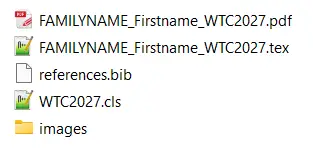
Authors must upload a single ZIP file in the submission portal. The ZIP file must contain all of the following:
- The compiled PDF: FAMILYNAME_Firstname_WTC2027.pdf
- The main LaTeX file: FAMILYNAME_Firstname_WTC2027.tex
- The class file: WTC2027.cls
- The bibliography file: references.bib
- The images folder: images/
Name the ZIP file: FAMILYNAME_Firstname_WTC2027.zip
Please use the name of the presenting author only.
If you are submitting more than one paper, add a number at the end (e.g. FAMILYNAME_Firstname_WTC2027_2.zip).
Step 9 – Download and sign the “Consent to Publish Form” (will be available for download shortly)
The corresponding author must sign and upload the official Consent to Publish Form on behalf of all co-authors before the paper can be included in the ITA WTC2027 proceedings.
Please name your consent form as follows: FAMILYNAME_Firstname_Consent_WTC2027.pdf
If you are submitting more than one paper, add a number at the end (FAMILYNAME_Firstname_Consent_WTC2027_2.pdf).
We accept both traditional scanned copies and PDFs signed digitally using a verified Digital ID (e.g. Adobe Sign, DocuSign, PDF-XChange Editor, or your institution’s digital certificate).
Step 10 – Submit your paper!
Submit all files including the Consent to Publish Form via the paper portal by Sunday 25 October 2026 23:59 CET (Central European Time!)
By submitting your paper, you agree to the Submitting Author’s Declaration.
For any questions, please contact wtc2027scientific@aimgroup.eu